
A LiveFlow alternative for QuickBooks Online: the finished monthly pack, with no workbook to maintain
Key takeaways
- Reportly ends the month with the pack, not with a workbook: the QuickBooks Online numbers land in your own PowerPoint, PDF or Excel layout, the commentary is drafted from what moved, and the budget, the rolling forecast and the 13-week cash forecast sit next to the actuals. Nothing is built in formulas and nothing has to be kept alive between months.
- LiveFlow is a live link from QuickBooks Online into Google Sheets and Excel, with consolidation across entities, dashboards and department budgeting, sold to accounting firms and finance teams by demo. The report is a workbook you build and maintain; its product pages name no commentary, no PDF and no PowerPoint.
- LiveFlow's remaining complaints are spreadsheet complaints: formulas that have to fit inside the tool, year-over-year and other report shapes combined by hand, the first version of each custom-mapped report as a project of its own, and a price its users call high.
- Reportly publishes its price: $99 a month for one company ($79 billed yearly), $59 for each added company, no implementation fee, a 14-day trial without a card. LiveFlow publishes no price: its pricing page offers a demo, and its QuickBooks App Store listing says "Custom price" and no free trial. Prices checked 28 October 2026.
- Choose Reportly when the deliverable is the finished monthly pack with the story written, at a price you can read before the demo. Choose LiveFlow when you build your own reporting in Google Sheets or Excel, consolidate many entities with eliminations and currencies, or need the numbers live every day rather than at month-end.
The short answer
LiveFlow puts live QuickBooks Online data into a Google Sheets or Excel workbook, so that you build the report there and it keeps refreshing. Reportly, financial reporting software for small and mid-sized businesses, does the other half of the job: it takes the same ledger and returns the monthly pack in your own layout, with the commentary drafted and nothing to build or maintain in between.
If your practice consolidates groups with intercompany eliminations and several currencies, or your clients want to open a live sheet on any day of the month, LiveFlow is the stronger tool and we say so below. If the month still ends with you turning the workbook into a pack and writing the commentary, keep reading.
In one sentence: pick Reportly over LiveFlow when the deliverable is the finished monthly pack with the story written; pick LiveFlow when the deliverable is a live spreadsheet or a consolidation across many entities.
See all nine financial reporting tools for QuickBooks Online compared.
Reportly vs LiveFlow: finished pack or live workbook
The accountant who looks at LiveFlow has stopped exporting CSVs and wants the numbers to flow into the report by themselves. Reportly agrees with the first half and skips the second: the numbers flow, but there is no workbook in between. The two overlap on the data pull and on budget against actual. They differ in what the month produces: in LiveFlow a live workbook you designed, which you then turn into the thing your client or board reads; in Reportly that thing itself, finished.
LiveFlow's product pages say what it is: "Turn Google Sheets into your financial command center", "Transform Excel into your financial command center". The report lives in the workbook. You pick one of its templates or build your own, map the accounts, write the formulas, and LiveFlow keeps the cells current. That is the right tool for someone who wants to keep working in a spreadsheet, and it is why the dislikes in its most recent G2 reviews are spreadsheet dislikes: "Sometimes I struggle with building formulas that work within the boundaries of the software" (G2, director of operations, December 2025); "I wish there was more customization in the dashboards, particularly the ability to add custom formulas" (G2, January 2026); a year-over-year view where "a prior year report and a current year report have to be combined into one report" (G2, December 2025).
In Reportly there is no workbook. You send the pack you delivered last month, as PowerPoint, PDF or Excel, and it becomes the template: your sections, your line order, your grouping of the P&L, your comparison columns, current month, year to date, same period last year. Every month the ledger refills it. Nothing in it is a formula you wrote, so there is nothing to repair or extend when the layout changes. The chart of accounts stays as it is in QuickBooks Online; how your accounts map to your lines is reviewed with you in the first month and held after that.
For a practice, every client company runs the same routine under one account, each with its own template, users and roles. The tenth client's pack is a template and a connection, not a tenth workbook to keep alive.
How Reportly drafts the commentary
A live workbook tells the reader what the numbers are. It does not tell them why. LiveFlow's product pages describe live reports, dashboards shared in real time and "dashboard snapshots" that freeze the numbers; none of them describes commentary, so the explanation of the month is written somewhere else, by you, every month.
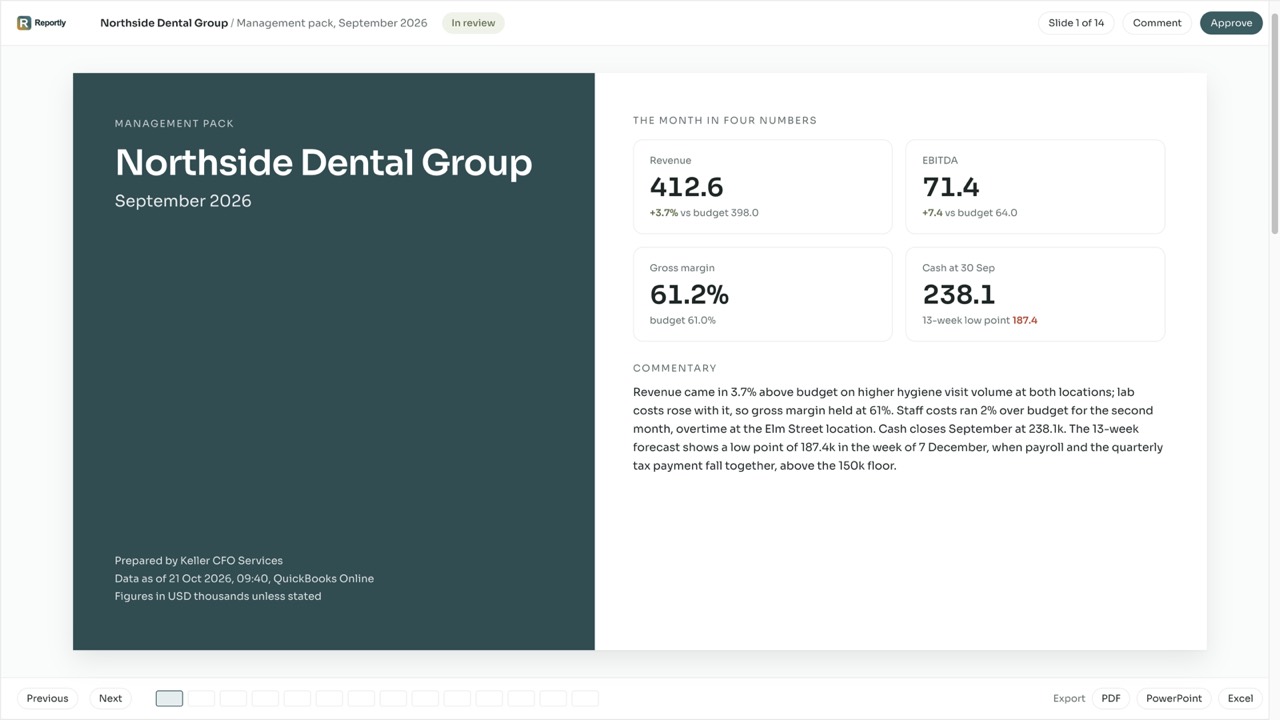
Reportly drafts the commentary from what moved: against budget, against last month, against the same month last year, in the order of your pack. Last month's text comes forward with it, so the work is editing what changed, not writing the month from a blank page. The draft is written by Reportly's AI, and your data is never used to train models for other customers. The owner, the board or the lender gets one file with the numbers and the reasons in it, not a link into a sheet.
The plan sits in the same file. The budget is locked as the yardstick for the year, the rolling forecast is re-based from the actuals every month, and the 13-week cash forecast runs from receivables, payables and recurring costs in the ledger; every pack shows actual against budget against forecast on one page.
LiveFlow pricing vs Reportly pricing
LiveFlow's pricing page says "Pricing is tailored to what you need" and offers a demo. Its QuickBooks App Store listing shows one "Custom plan" at a "Custom price" and answers the trial question with "Currently, we do not offer a free trial." The number comes after the demo. G2's reviewers tag the price ten times among the cons; one of the most recent writes "The price point is a little high" (G2, December 2025), and a Capterra reviewer put it more bluntly: "it is expensive, even more expensive than QBO itself" (Capterra, July 2025).
Reportly's price is on its pricing page. Reporting is $99 a month for one company ($79 billed yearly): the pack in your layout with the commentary drafted and your uploaded budget next to the actuals. Planning is $199 a month ($159 billed yearly) and adds the budget built inside Reportly, the rolling forecast, the 13-week cash forecast and the report builder. A second client company costs $59 a month on Reporting and $99 on Planning, and so does the twentieth. There is no implementation fee: set-up is done with you in the first month and is part of the plan. The trial is 14 days and asks for no card. Prices checked on 28 October 2026 on both vendors' pricing pages and on LiveFlow's QuickBooks App Store listing.
What LiveFlow's price buys is real: consolidation across any number of entities in 160-plus currencies with eliminations, live data on any day of the month, a support team its reviewers praise. If you need those, pay for them. If you need the monthly pack, the price of the pack is $99 and you can read it before anyone books a call.
Your pack, refilled from QuickBooks Online every month, with the commentary drafted.
What its reviewers say, by theme
LiveFlow started in 2021 as a QuickBooks-to-Google-Sheets link for accountants, backed by Y Combinator, and has raised about $17 million; consolidation, dashboards and department budgeting came later. Its ratings are among the best in the category: 4.9 from 332 reviews on G2, where it holds "Easiest Setup" badges, 4.9 from 374 ratings on the QuickBooks App Store, and G2's summary of the reviews puts time to implement at one month, the same month Reportly's set-up takes. The praise is consistent: the sync, the consolidation, the support. The dislikes group into four themes.
| Theme | What reviewers write | What it means for the month |
|---|---|---|
| Formulas inside the tool's limits | "Sometimes I struggle with building formulas that work within the boundaries of the software but the liveflow team is always there to assist." (G2, December 2025) "I wish there was more customization in the dashboards, particularly the ability to add custom formulas for more advanced reporting needs." (G2, January 2026) | The report is still a spreadsheet, now with rules about what the cells may contain. |
| Report shapes assembled by hand | "a prior year report and a current year report have to be combined into one report to view the year over year comparisons. This is cumbersome and time-consuming." (G2, December 2025) "I would love to be able to customize columns or delete parts of reports I don't need." (G2, December 2025) | The comparison columns of your pack are yours to build, and yours to keep. |
| The first version of each report | "The initial setup of complex, custom-mapped reports can take a little bit of time." (G2, December 2025) "Some drill-down capabilities are missing when using consolidation workbooks and reports." (G2, December 2025) | Each client's workbook starts as a mapping project; the support team helps, the work is yours. |
| Price | "The price point is a little high." (G2, December 2025) "it is expensive, even more expensive than QBO itself" (Capterra, July 2025) G2's cons tags count "Expensive" ten times. | A custom quote, no trial, and a number you learn after the demo. |
Where the company is heading is also visible. Its homepage now opens with a connector that lets assistants such as Claude, ChatGPT and Grok pull QuickBooks Online reports into a chat, and the newer product, Flow, is its own accounting platform that brings the ledger, payables and receivables and planning into one place, aimed first at construction finance teams. The live sheet, the consolidation and the dashboards remain, and they are good. The monthly pack, written and finished, was never the product.
Side by side: Reportly vs LiveFlow
| Feature | Reportly | LiveFlow |
|---|---|---|
| Starting point | Your own pack as the template, set up with you | A Google Sheets or Excel workbook you build from templates and live QuickBooks data |
| Output | The finished monthly pack as PowerPoint, PDF or Excel | Live workbooks in Google Sheets or Excel; dashboards shared live or frozen as snapshots |
| Commentary | Drafted every month from what moved, carried forward | Not described on the product pages; written by you outside the tool |
| Cadence | The monthly pack, refreshed on every pull | Live, any day of the month |
| Budget and forecast | Budget as the yardstick, rolling forecast, 13-week cash forecast from the ledger | Budgeting and forecasting, budget against actuals, cash flow forecasting, department budgets with an approval flow |
| Comparison columns | Your pack's columns, refilled: current month, year to date, same period last year | Built in the workbook; reviewers combine a prior-year and a current-year report for year over year |
| Multi-entity consolidation | Enterprise plan | Core product: any number of entities, 160-plus currencies, intercompany eliminations, partial ownership |
| Who buys | The finance person directly, or a practice for its portfolio | Accounting firms and finance teams, by demo |
| Accounting systems | QuickBooks Online, Vecty, NetSuite; further systems on request | QuickBooks Online, Xero |
| Set-up | Done with you in the first month; no implementation fee | Connect and build; G2's review summary puts time to implement at one month |
| Users | Users and roles per company | Not stated on the pricing page |
| One company, per month | $99 for the pack ($79 yearly); $199 with budget, forecast and cash ($159 yearly); each added company $59 a month on Reporting and $99 on Planning | No price published; "Custom price" on the QuickBooks App Store listing; quote after a demo |
| Trial | 14 days, no card | None ("Currently, we do not offer a free trial", QuickBooks App Store FAQ); demo first |
Prices checked on 28 October 2026 on both vendors' pricing pages and on LiveFlow's QuickBooks App Store listing. Ratings checked the same day.
When LiveFlow is the better choice
- You consolidate a group: several entities, intercompany eliminations, more than one currency, partial ownership. Reportly's consolidation is on the Enterprise plan; LiveFlow's is the core product.
- Your reporting lives in Google Sheets or Excel by design, your team builds its own models there, and you want the QuickBooks Online numbers to arrive in the cells without an export.
- Your clients want to open live numbers on any day of the month, not a pack at month-end.
- Your department heads budget in their own spreadsheets and you want their lines submitted and approved into one master budget.
- Your companies are on Xero. Reportly connects to QuickBooks Online, Vecty and NetSuite.
- You want to pull QuickBooks Online reports into Claude, ChatGPT or Grok through LiveFlow's connector.
Frequently asked questions
Is Reportly a LiveFlow alternative for QuickBooks Online?
For the finished pack, yes. Reportly connects to QuickBooks Online and delivers the monthly pack in your own layout with the commentary drafted; LiveFlow delivers live QuickBooks Online data into Google Sheets and Excel workbooks, plus consolidation and dashboards. If your deliverable is the pack rather than a live workbook, Reportly replaces the export, the workbook and the write-up in one step.
Is Reportly cheaper than LiveFlow?
On every published figure, yes. Reportly is $99 a month for one company and $199 with planning, $59 a month on Reporting and $99 on Planning for each added company, with no implementation fee. LiveFlow publishes no price: its pricing page offers a demo and its QuickBooks App Store listing says "Custom price", so the comparison is between a figure you can read and a quote you request. Checked 28 October 2026.
Does Reportly work in Google Sheets or Excel?
Reportly is not a spreadsheet add-in. Your Excel or PowerPoint pack is the template, and the finished pack comes back as PowerPoint, PDF or Excel. If you want live cells that refresh inside a sheet you keep building on, that is LiveFlow's product.
Can Reportly consolidate several companies?
A practice runs each client company under one account, each with its own pack, users and roles. Group consolidation with eliminations is on the Enterprise plan. A group with many entities and several currencies is LiveFlow's ground, and we say so above.
Is there an implementation fee?
No. Set-up with you in the first month is part of every plan: the QuickBooks Online connection, a review of how your accounts map to your lines, your own pack as the template, the budget from your history. The trial is 14 days and asks for no card.
Who builds Reportly?
Reportly is made by Reportlyai Inc., a Delaware company in Dover, founded in 2025. Narek Abgaryan leads it as CEO, Garnik Ghazaryan is CTO and David Tarkhanyan is CFO; the pack, the commentary and the set-up described on this page are their work.
How much does LiveFlow cost?
LiveFlow publishes no price. Its pricing page says "Pricing is tailored to what you need" and offers a demo, and its QuickBooks App Store listing shows one "Custom plan" at a "Custom price". Checked 28 October 2026.
What are the best LiveFlow alternatives?
It depends on what your month has to end with. For the finished monthly pack in your own format, with the commentary drafted, Reportly. For dashboards at the lowest price, Syft. For Fathom's style of report with strong consolidation and forecasting, Fathom. For a live spreadsheet, Reach. For a planning model sold through your accountant, Jirav. For many locations on one chart of accounts, Qvinci. See all nine tools compared.
If the month still ends with you turning a workbook into the pack and writing the story, start the trial and send us the pack you delivered last month: next month it comes back refilled from QuickBooks Online, with the commentary drafted. See how Reportly's QuickBooks reporting uses your own file as the template.