
A Syft Analytics alternative for QuickBooks Online: the finished pack in your own format, every month
Key takeaways
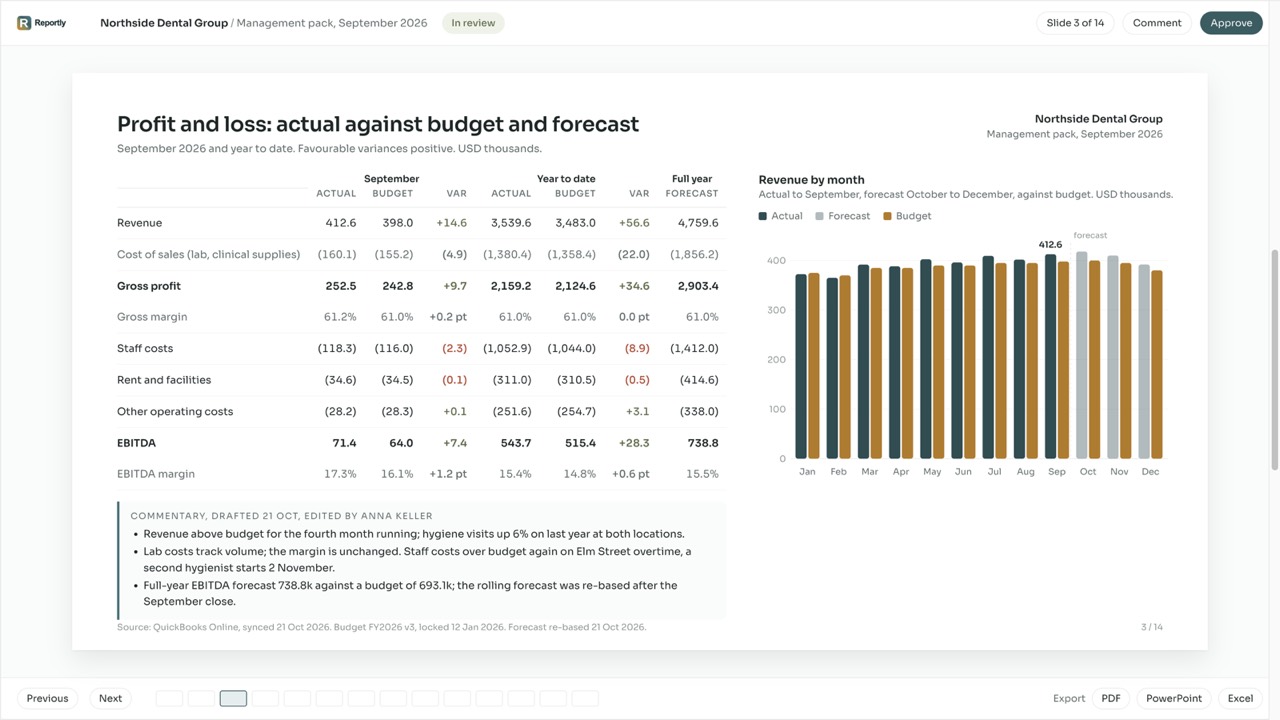
- Reportly delivers the finished monthly pack from QuickBooks Online: your own PowerPoint, Excel or PDF as the template, the numbers refilled every month, the commentary drafted and carried forward, the budget, the rolling forecast and the 13-week cash forecast next to the actuals.
- Reportly is built by the team behind Hundred MS, a CFO practice that produces monthly packs, budgets and a weekly cash forecast for its own clients. Set-up is done with you, by people who deliver packs every month.
- Syft Analytics is a dashboard and report layer owned by Xero. Its own reviewers' recurring complaints are report customisation (columns, comparisons, the cash flow statement) and QuickBooks data connections, and it exports PDF, Excel and Word, not PowerPoint.
- One company: Reportly $99 a month ($79 on annual billing); Syft from $23, with a free dashboard plan. The difference buys the pack finished in your format instead of the rebuild after the export. Prices checked 27 October 2026.
- Choose Reportly when the deliverable is the monthly pack in your own format, finished, with the commentary drafted. Choose Syft if your companies are on Xero, you want a free dashboard plan, or you consolidate a group with eliminations.
The short answer
Syft gives you dashboards, interactive financials and a library of reports on top of the QuickBooks Online ledger. What it does not do is finish the pack: the file your owner, board or lender reads, in their layout, with this month's explanation written. That part of the month stays with you, and Reportly exists for that part: financial reporting software for small and mid-sized businesses that connects to QuickBooks Online and turns the ledger into the monthly pack, management reports, budgets and forecasts, in your own format, with the commentary drafted.
If you want live dashboards your clients log into, a free plan to start on, or your companies are on Xero, Syft is the right tool and we say so below. If your month still ends with Syft's export, a rebuild in Excel and a paste into PowerPoint, keep reading.
In one sentence: pick Reportly over Syft when the deliverable is a monthly pack in your own format; pick Syft when you want dashboards across many ledgers at the lowest price.
See all nine financial reporting tools for QuickBooks Online compared.
Month-end in Reportly vs Syft, step by step
Refresh. Both connect to QuickBooks Online and pull the ledger. In Reportly the mapping of your accounts is tied to the account, not its name, and a new, renamed or merged account lands in a review list before any pack is produced. Syft maps accounts too; its QuickBooks reviewers describe re-linking entities and fixing report layouts after a connection drops.
Shape. In Syft you pick a report from the library and set it up within its options. In Reportly your own file is the template: your sections, your line order, your grouping of the P&L, your comparison columns. The ledger's chart of accounts stays as it is.
Explain. Syft's automated commentary describes the numbers on the screen. Reportly drafts the commentary from what moved against budget and against last month, and carries last month's text forward, so you edit the delta instead of writing the story again. Reportly's AI drafts it; your data is never used to train models for other customers.
Plan. Both hold budgets and forecasts. In Reportly the budget is the yardstick and stays fixed, the rolling forecast is what moves, and every pack shows actual against both. The 13-week cash forecast runs from the ledger: opening balance, receivables and payables by due date, recurring costs from history.
Deliver. Syft exports PDF, Excel and Word, or shares a live view. Reportly's output is the pack itself: PowerPoint, PDF or Excel in your layout, ready to send. For a portfolio, every client company runs the same routine under one account, each with its own users and roles.
Who built it
Reportly is built by the team behind Hundred MS, a CFO practice that produces monthly packs, budgets and a weekly cash forecast for its own clients. The five steps above are that practice's own month-end, turned into software. Set-up is done with you by those people, not left to a course library.
What Syft users complain about
Syft started in Johannesburg in 2016 as a reporting layer on Xero and QuickBooks for accountants and their clients, and Xero bought it in 2024. It covers a lot of ground: dashboards, interactive financials, consolidation across entities and currencies, budgets and forecasts, a data review module, benchmarking and valuations, across Xero, QuickBooks Online and Desktop, Sage, MYOB, FreshBooks and FreeAgent, with unlimited users on every plan. QuickBooks users rate it 4.8 on the QuickBooks App Store, and the recent reviews there praise the dashboards and the look of the reports. The complaints sit in one place: what happens when the report has to be yours.
"Reporting isn't always as flexible as I'd like."G2, accounting firm, April 2026; the same review adds that the cash flow statement cannot be changed
"It could use more customizations. Specifically around column settings and comparisons."G2, controller, 2024
The QuickBooks App Store's own summary of the reviews, read in October 2026, lists "unreliable QuickBooks sync, slow data refresh, and limited customization options" among the mentions.
The pattern: Syft's reports are Syft's. Columns, comparisons and the cash flow statement are set within its options, the exports are PDF, Excel and Word with no PowerPoint, and a QuickBooks connection that drops is yours to re-link. Reportly starts from your file and ends with your pack.
Side by side: Reportly vs Syft Analytics
| Feature | Reportly | Syft Analytics |
|---|---|---|
| Starting point | Your own pack as the template, or a pack the way our practice sets it up | A report library and dashboards, configured within Syft |
| Output | The finished monthly pack as PowerPoint, PDF or Excel | PDF, Excel, Word, live web views |
| Commentary | Drafted every month from what moved, carried forward | Automated commentary on the report |
| Columns and comparisons | Yours, from your template | Within Syft's options |
| Chart of accounts changes | Review list before the pack; mapping tied to the account | Re-mapped in Syft |
| Budget and forecast | Budget as the yardstick, rolling forecast, actual against both in every pack | Budgets and forecasts, driver-based, up to ten years |
| Cash ahead | 13-week cash forecast from the ledger | Cash flow forecast |
| Multi-entity consolidation | Enterprise plan | Yes: unlimited entities, eliminations, currencies |
| Users | Users and roles per company | Unlimited on every plan |
| Accounting systems | QuickBooks Online, Vecty, NetSuite; further systems on request | Xero, QuickBooks Online, QuickBooks Desktop, Sage, MYOB, FreshBooks, FreeAgent, Sage Intacct |
| Set-up | Done with you by the practice behind the product | Self-serve with Syft Campus; tailored onboarding on Advanced |
| Free plan | No | Yes, dashboards |
| One company, per month | $99 ($79 on annual) | $23 Standard, $47 Plus, $95 Advanced |
| Trial | 14 days, no card | 14 days, no card |
Prices checked on 27 October 2026 on each vendor's pricing page. App store rating checked the same day.
On price, Syft is cheaper on the invoice: a free Basic plan with dashboards, then $23, $47 and $95 a month per entity, against Reportly's $99 a month for one company ($79 billed yearly) and $59 for each added client company, the same price whatever the count. What the difference buys is the part Syft leaves with you: the pack in your own format, finished, with the commentary drafted, set up with you by people who deliver packs every month. If your month-end after Syft is a few clicks, keep Syft. If it is hours of rebuilding in Excel and PowerPoint, that is what the difference buys back. The Reportly plans and what each includes are on the pricing page.
Your pack, in your layout, finished every month.
When Syft is the better choice
- Your companies are on Xero. Syft is Xero's own analytics layer and connects to it natively; Reportly does not connect to Xero.
- You want a free plan, or the lowest price for a reporting layer, and the pack is a few clicks after the export.
- You consolidate a group: several entities, eliminations, more than one currency. Reportly consolidates on the Enterprise plan, and it is not what the product is built around.
- Your clients are on QuickBooks Desktop, Sage, MYOB, FreshBooks or FreeAgent.
- You want data review, industry benchmarking or a business valuation inside the same tool. Reportly does none of these.
Frequently asked questions
Is Reportly a Syft Analytics alternative for QuickBooks Online?
Reportly delivers the finished monthly pack from QuickBooks Online in your own format, with the commentary drafted and carried forward, and keeps the budget, the rolling forecast and the cash forecast next to the actuals. Syft is an analytics layer with dashboards and a report library at a lower price. For the finance person who wants the pack finished rather than another place to look at the numbers, yes.
Is Reportly cheaper than Syft Analytics?
No. Syft has a free plan and paid plans from $23 a month; Reportly is $99 a month for one company ($79 on annual billing), checked 27 October 2026. The difference buys the pack in your own format, finished, with set-up done with you.
Does Reportly have a free plan?
No. Reportly has a 14-day free trial. Syft's Basic plan is free and includes dashboards.
Does Reportly export to PowerPoint?
Yes: PowerPoint, PDF and Excel. Syft exports PDF, Excel and Word and has no PowerPoint export (checked 27 October 2026).
Does Reportly work with Xero?
No. Reportly connects to QuickBooks Online, Vecty and NetSuite, with further systems on request. Syft is owned by Xero and connects to it natively.
Who builds Reportly?
Reportly is built by the team behind Hundred MS, a CFO practice that produces monthly packs, budgets and a weekly cash forecast for its own clients. The routine the practice runs for its clients is what the software runs.
How much does Syft Analytics cost?
Syft has a free Basic plan with dashboards, then $23 Standard, $47 Plus and $95 Advanced a month per entity. Checked 27 October 2026.
What are the best Syft Analytics alternatives?
It depends on what your month has to end with. For the finished monthly pack in your own format, with the commentary drafted, Reportly. For Fathom's style of report with strong consolidation and forecasting, Fathom. For a live spreadsheet, LiveFlow or Reach. For a planning model sold through your accountant, Jirav. For many locations on one chart of accounts, Qvinci. See all nine tools compared.
If the pack after the dashboard is the part of your month you keep rebuilding, start the trial and send us the pack you delivered last month: next month it comes back finished. See how Reportly's QuickBooks reporting uses your own file as the template.